NullSpace
Game Design Document
Producer, Josh Hobbes
Designer, CJ Clark
Technical Director, Ed Pfent
Technical Writer, Jeff Keely
Art Director, Nathan Gray
Product Manager, Dan Brakeley
Lead Tester, Amadou Savadogo
Table of Contents
Ships energy meter and taking damage
Minimum
Education Requirements
Sound and Music Legal Information
Top Competing Performers by Key
Feature
Game Overview
High Concept
NullSpace is a 2D shooter for the PC using 3D Graphics, selectable camera angles, and Newtonian physics to immerse players in team-based futuristic space combat.
Genre
2D Shooter
/ Simulation
Target Platform
Required
Windows
9x/NT/2000/ME
PII
300mhz CPU
64MB RAM
8MB
OpenGL compatible 3D video card
100MB
free hard drive space
Direct
Sound compatible Sound Card
CDROM
TCP/IP
Internet connection required for online play
Recommended
Windows
9x/NT/2000/ME
PII
600mhz CPU
64MB RAM
32MB
OpenGL compatible 3D video card
100MB
free hard drive space
Direct
Sound compatible Sound Card
CDROM
DSL/Cable
or faster connection to the Internet
Key Features
Newtonian Physics
Accurate Newtonian physics for game-play that is intuitive
to learn and hard to master
Ships of varying masses behave differently, with larger ships turning slower than smaller ships, giving low weight a maneuverability advantage, but at the cost of weapons or armor. Also, the ships will drift with realistic inertia in zero gravity.
Persistent Online Multiplayer
Online, persistent death match for continuous multiplayer
game play
Servers with variable numbers of players allow both AI and human players to duke it out in huge arenas. If the total number of players falls below a minimum, AI bots will be spawned to keep the server populated and the game intense. This minimum number of players is set by the server and can go from zero to as high as the server can handle. If a player wants to host a game with only human players, he or she can set the minimum to zero. If a player would like to play a single player game, he or she can set the minimum to any number and there will be that many AI Bots. If the player is then the only one to log onto that server it will essentially be a single player game.
Bounty-based Scoring
Bounty-based scoring with rankings based on not only kills,
but also whom you killed, and whom he killed
Scoring is kept on the server to allow players to build up a reputation and increase their ranking. As a player gets kills, his bounty increases, causing those around him to seek him out. This keeps good players challenged and gives weaker players a common goal. This type of scoring keeps the player coming back to try and stay at the top of the pack. This is a goal that is constantly changing, and therefore adds to the replay ability.
Multiple View Modes
Top-down, ¾, and first-person view modes allow for a greater
variety of game-play
The first person view gives the player a greater sense of immersion and challenge. It also allows the player to see further in the direction they’re facing. On the other hand, the top-down view allows players to see the entire area immediately surrounding their ship, including directly behind them. The ¾ view is a compromise between these two. It lets the player see fairly far into the distance and yet still allows them to see behind their ship.
Story
Through out the long and twisting History of Mankind, one time period stands out among the rest. The Neo-Dark Ages was a time when Human Beings traveled across the never-ending stellar void, known as Space. Every race and culture went forth in all dimensions to populate the Heavens. Such long travels brought people together, but in the end, the vast distance drove human beings apart. Solar systems waged war on neighboring Solar systems. In galaxy after galaxy war spread like a wildfire. The entire universe was in a stellar war. Commoners, the universe over, lived in fear. Nations fell like dominos as wars drained economies. For a long time, Humans lived in fear, famine, and war.
One of the mightier nations, Cancer, had a great general named Orion. Orion was a kind and passionate man who wanted nothing more than to end the Stellar Wars. Orion was forgiving of his enemies. He released prisoners, fed the hungry, and brought peace to wherever he led his troops. He was immensely popular. The People of Cancer loved Orion so much that after Cancer’s Emperor died of a sudden illness, they overthrew his son and named Orion as the new Emperor of Cancer.
Orion did his best to rule Cancer and brought peace to the universe. After a long and weary campaign that lasted forty-six years, the Stellar Wars were over and peace returned to the Universe. The bloodline of Orion ruled the Colonized Universe, every generation finding new habitations and technologies. However, every generation pays their respect to Orion by obeying his last wish.
While Orion was on his deathbed, he told his son and soon to be Emperor, Leo, about the great Olympic games he heard about when he was a child. Orion wanted to bring back the games; games that had men battle the impossible, risking their lives to gain the favor of the Emperor and of the people. Leo obeyed Orion’s last request and declared that on the start of every new century, an Olympic Contest would begin and would end on the eve of Orion’s death.
The games lifted the spirits of the universe. Everyone, everywhere, watched these games. They were a symbol of how the universe was united under one man's vision of peace. However, the games became riskier and the crowds became more bloodthirsty.
Of all the games none were as deadly as the ship events. Space Pilots from every galaxy would come to battle for the honor of Orion. In time, the competition became know as the Constellation Games, since anyone gazing at the stars would be able to see it. All the brave warriors that came to compete would receive the new model of a Stellar-pulsar Technological Energy Efficient Defensive Spacecraft, a.k.a. S.T.E.E.D.S., to battle in. The team that survived the nine months of competition earned the right to their S.T.E.E.D.S. and to any newly discovered galaxies.
One hundred years have passed since the last Constellation Games. The time has come for all brave pilots to mount their S.T.E.E.D.S. They are off to a deserted piece of space, only known as the Null Space, to pay their respects to Orion and maybe win a small fortune.
Game Objectives
The player’s main objective in NullSpace is to gain a high bounty and a great kill/death ratio (more kills than deaths is good). When a player destroys an enemy, that player will receive bounty points (bp). The more kills a player accumulates, the higher the bounty becomes on that player. If a player destroys another player with a high bounty, that player will have received more points than if he/she would have destroyed an enemy with a low bounty. A player can also gain bp through the collection of power-up items.
For example, we have John, Frank, and Butthead. John has been on a rampage destroying everyone in his path and by doing so has acquired 156 bp. Frank has been doing okay but only has 43 bp. Here comes along some punk named Butthead with a measly 33 bp. Butthead blasts Frank into oblivion and has gained 8 bp. He then crosses paths with John in which with amazing luck was able to destroy him, therefore adding 53 bp to his score. Because of Butthead’s high bounty (now at 94), enemies will be on the prowl looking to destroy him and receive the high bounty to add to their own.
Game Mechanics
Core Game Play
Players traverse through the level using a space fighter plane in a 3D world that is played on a large 2D plane. The world is entirely based on this single plane so there is no vertical movement at all. Everything else, though, is fully 3D. This includes the walls, spaceships, items, projectiles, etc. Movement through this 3D world is done with realistic physics, as a normal spacecraft will move in space. Colliding into a wall will cause the players ship to bounce off the wall realistically.
It is the player’s job to guide their ship through this world seeking out enemy ships to attack and defeat. The player can collect weapons along the way that will benefit them towards this goal. Each weapon has unique characteristics that have advantages and disadvantages of their own. The player will also have shields, which will protect their ship from the damaging shots that an opponent will fire upon them but these shields are limited. Shields are powered by Energy; the same Energy that powers weapons. Once the shields have been disabled the player will be open to being shot down if hit by another shot. Energy slowly regenerates naturally.
If the player encounters an enemy they can turn their ship to face the enemy and fire their primary or secondary weapons at them in an attempt to defeat them. Ships have an infinite number of primary shots (bullets), limited only by Energy. Secondary weapons are limited in number and are only acquired by gathering multi-prizes. The one exception to this is the bomb, which is only limited by energy much like the bullets.
If the player is fired upon they can decide to get hit, if they are already lined up for a shot, or they can dodge the shot by strafing to the side with side thrusters. The player will not stop flying if they let go of the directional button but will instead continue to fly at the same speed they were going when they let go of the button. The player must then accelerate in the opposite direction in order to stop. The player could fire a powerful exploding shot into the side of an enemy that would cause them to realistically spin and drift away, taking away their chance to fire a straight shot at the player.
Teams
NullSpace makes use of
a team system wherein the player is automatically assigned a team when he
enters a server. The player can then
change teams by typing “=<team number>” into a chat box. The player can only join teams who have less
teammate’s than the maximum team size as specified by the server. Teammates cannot inflict damage on each
other, and friendly fire is ignored for collision and damage purposes. This means that shots fired by a player’s
teammates will pass through that player.
However, if a player is near an explosion, he will get damage from it
regardless of who caused the explosion.
Game Flow
After the player
enters the game, they spawn at some random point in a general area of the
level, like a safe zone or an area near a safe zone. At this point the player can fly around and collect the
Multi-prize items by running into them with their ship. This upgrades their ship so that they have a
better chance of defeating opponents.
After collecting
enough Multi-prize items and getting their random upgrades, allowing the player
to feel confident that they are powerful enough, the player can fly into
battle. The player will fly around the
level, seeking out enemies to battle with and hopefully defeat.
If they defeat an
enemy, their bounty goes up, causing them to be a more worthwhile target for
enemies, raising the challenge of the game.
If the player defeats an enemy, the player will move on to another
enemy.
If an enemy defeats
the player, they automatically re-spawn in a random location with all bounty
and power-ups taken away. At this point
the player must begin anew by collecting more Multi-prize items and searching
for enemies again to raise their bounty.
It is the players’ goal to have as high bounty as
possible and to be the number one combatant in the tournament. The only way to do this is by defeating the
numerous enemies that fly about the level.
The more enemies defeated, the higher the bounty. Players’ scores will be saved, so that when they
begin a new game after previously quitting they will still have their statistics
from previous games.
Characters and Units
NullSpace features nine ships that the player can choose from. Each ship has it’s own strengths and weaknesses, with no one ship being ideal. The player has the choice to find a ship that best suits their playing style.
Each ship is rated in nine categories.
- Armor Strength – The amount of damage a ship always absorbs before losing any energy from an attack.
- Weapon Strength – The amount of damage a shot delivers.
- Main Thrust – The force behind a forwards or backwards thrust. This is not how fast a ship can go, but how much force is applied during a thrust, affecting how quickly a ship can accelerate.
- Turning and Strafing Thrust – The force behind turning and strafing thrusts. This is not how fast you can turn or strafe, but how much force is applied during a turning or strafing thrust, affecting how quickly a ship can turn.
- Top Speed – This is the maximum speed the ship can travel at.
- Firing Rate – The rate that bullets are fired (bullets/sec.). There is also a short delay after firing bombs, during which no weapons may fire.
- Weapon Drain – The amount of energy used to fire a bullet.
- Weapon Spread – The number of gun barrels. Each barrel fires whenever the player shoots. Weapon Spread is ship specific, and is not upgradeable.
- Mass – The total mass of the ship. This will factor into acceleration and collision damage calculations.
Each category can have one of three values: L (low), M (medium), or H (high).
|
Ship Name |
Armor |
Weapon Strength |
Firing
Rate |
Weapon
Drain |
Weapon
Spread |
Main Thrust |
Side Thrust |
Top Speed |
Mass |
|
Speedy |
L |
L |
H |
M |
M |
H |
H |
H |
L |
|
All Around |
M |
M |
M |
M |
M |
M |
M |
M |
M |
|
Wrecking Ball |
H |
L |
M |
H |
M |
L |
L |
H |
H |
|
Bomber |
M |
H |
L |
M |
L |
L |
L |
H |
M |
|
Gunner |
L |
H |
H |
H |
L |
M |
L |
M |
H |
|
UFO |
M |
M |
M |
M |
H |
L |
H |
M |
H |
|
Tank |
H |
H |
L |
H |
L |
L |
L |
L |
H |
|
Interceptor |
L |
H |
H |
M |
L |
H |
H |
L |
M |
|
Prototype |
H |
M |
M |
L |
H |
L |
H |
H |
L |
Game Play Elements
The environment in NullSpace is a flat 2D plane upon which the game is played. The map will be drawn in 3D by extruding polygons out of a flat 2D map. The map will be composed of squares that can have one of the following states:
- Empty space. The player can fly through these areas unhindered.
- Solid Wall. The player cannot fly through these areas, and will collide with the edge before entering these areas. There are two types of solid walls:
- Solid Wall: This wall exists at the start of a map and can never be destroyed.
- Dropped Wall: This is a wall that someone can drop on the map using the Brick Power-up. Players on the same team as the player who dropped the wall can traverse the wall as if it weren’t there. Players on other teams cannot traverse the wall at all. When the player who dropped the wall is killed, the wall will disappear.
- Angled
Wall. These areas are half filled
with solid wall and half empty space.
The division is diagonal, from one corner to the opposite
corner. There are 4 variations of
these tiles, one for each rotation.
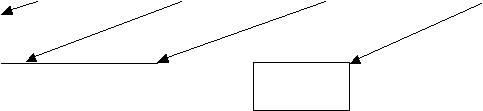
The below graphic illustrates these 4 walls:

- Safe
Area. The player can enter this
area just like empty space, only while in the safe area the player cannot
attack or be harmed. Also, the
player can press the primary fire button to bring their ship to an
immediate stop.
- Black holes. Black hole is part of a map, and is represented on the map as a swirling blackish circle. When the player collides with the center, they will be warped to a specific location and their energy bar will be depleted. The location they are warped to is set on the map when the map is created. If a player flies near a black hole, they will be pulled towards it, but can still escape.
- Multi-prize spawn point. This is a square upon which a multi-prize can appear. Multi-prizes will not appear on any other map grid area.
NullSpace will have a variety of weapons and items that the player can use. While in the game, the player can fly over “multi-prizes”, which are green packages that contain a random weapon, item, or upgrade. This is the only power-up that can be pickup up in game. All multi-prizes look the same.
Things that do damage
- Bullets – Primary weapon on all ships. It takes energy to fire, and has unlimited shots.
- Bombs – Secondary weapon on all ships. It takes energy to fire, and has unlimited shots. It uses more energy than bullets and also does more damage. There is also a two second delay after firing a bomb during which time no weapons can be fired.
- Mines – Pick up in a multi-prize. Once dropped, they will trigger when an enemy ship comes within its proximity.
- Shrapnel – Shrapnel will spew from any explosion: bombs, mines, and ships when they run out of energy. Shrapnel does a small amount of damage relative to bullets and bombs.
- Explosions – Explosions do area damage and the most damaging effects are felt at the center of the explosion.
Multi-prize Power-ups
- Energy up – This increases your maximum energy. This means that when your ship is fully charged, it has more energy than it did before. This does not increase the rate at which you recharge, just the maximum capacity of your ship.
- Thrust up – This increases the power behind your thrusters, allowing you to accelerate faster.
- Gun Damage up – This increases the amount of damage each shot does.
- Burst Mode – This will increase the amount of bullets that fire out of each barrel on your ship by 1 until a maximum of 5 is reached. The shots will move in a spread pattern out from the barrel like in Contra. If you have more than one barrel, each will be upgraded at the same time.
- Repel – Firing a Repel causes all movable objects near your ship to be pushed away from you. The Repel is very useful against big ships that will try to ram you and for when you get cornered.
- Brick (a.k.a. wall) – A brick is just a chunk of wall that can be dropped behind your ship to thwart enemies trying to follow you. You and your teammates can fly through bricks you drop, but enemies will bounce off them like any other wall.
- Warp Gate – The player can drop a warp gate at any point on the map. Once dropped, the player who dropped it can press a trigger and instantaneously warp back to that position. This is useful in a variety of ways, including getting the drop on, and escaping from, an enemy.
- Warp Disabler (interdictor) – This will prevent any ships within a certain range from being able to trigger their warp gates and warp away to safety. Good for chasing down enemies who keep warping to freedom.
- Anchor (a.k.a. Pendulum) – This is kind of like a weight that attaches to your ship, allowing your ship to get momentum in directions it wouldn’t normally be able to. The weight is attached to your ship by a line, and by forcing the weight around corners and against walls you can achieve more complicated maneuvers.
- Engine Stall – This causes your ship to come to a sudden dead halt, allowing the player to change their direction quickly.
- Immediate Warp – This moves the player from the current spot on the map to another immediately, without the player’s consent and without any way to control the destination.
Other Interactive elements
- Safe Zone – There are area’s in levels that the player can fly into and while the player is in this zone they are safe from shots and likewise cannot shoot. These zones are provided so that the player can take a break from the action and come back without fear of being destroyed. If the player exits this zone then all game play returns to normal. Attempting to fire shots while inside a safe zone brings a ship to an immediate stop.
- Wall (environment) – Ships and bullets bounce off walls. Bombs explode when they collide with walls.
- Black Hole – Black Holes pull all movable objects towards them. If a ship gets pulled into the center of a black hole, it is warped to a random spot on the map and dropped to a sliver of energy.
Game Physics and Statistics
Physics
All physics in the game are done using accurate Newtonian physics. The players ship will accelerate as would a normal space ship and continue at the same speed even when the player stops accelerating. The player will have to accelerate in the opposite direction in order to stop drifting. Turning will be handled by side thrusters on the ship that send the ship into a small spin that can be stopped by another thruster in the opposite direction. There will be no vertical movement since all movement is done on a 2D plane instead of a fully 3D world. If a player hits an object, like a wall, the ship will bounce off the object realistically depending upon the speed and angle hit. With these physics techniques the fighter ship will simulate a real spacecraft and simulate its environment very realistically.
All of the weapons in the game will also have physics behind them as they fly through the world. If a weapon hits a ship, the ship will act accordingly, sending it into a spin in the appropriate direction according to the weight of the shot and strength of the blast. If a primary fire bullet hits a ship it won’t make a noticeable difference to the ship, but if a bomb hits and explodes, the spin of the ship will be noticed. If a bullet hits a wall it will bounce off realistically. If any other weapon hits a wall it will detonate.
A ship’s acceleration will be determined by the ships mass and thrusting force. Larger ships will have a higher mass and be less affected by opponents’ shots while lighter and faster ships will be knocked around a lot more. Firing shots will also affect lighter ships more due to the force required to propel the shot towards an opponent. Firing your primary weapon (bullets) will affect the player much less than a bomb would. If the player is standing still and they fire a shot, they will be accelerated backwards a small amount, depending upon the type of shot fired.
Firing a weapon inside a safe zone will stop a ship completely. The weapon is not actually fired, the ship just stops. This allows the player to enter safe zones and leave their computers for a short time and not have to worry about their ship accidentally drifting out of the safe zone and into the shots of opponents.
Each object in the game (ships, fired shots, etc) will have the following physics-related data attached to it:
- Orientation
- Position (x, y)
- Mass
- Center of Mass
- Acceleration
- Angular Acceleration (acceleration of spin)
- Velocity
- Angular Velocity (speed of spin)
The player will be able to collide with a variety of surfaces. A list of possible collisions is as follows:
- Ship to Ship
- Ship to Weapon
- Ship to Wall
- Ship to Power-Up
- Weapon to Wall
Power-Ups do not move, therefore they will not need to collide with anything but moving objects, and since weapons cannot pick up or destroy items, the only thing they can hit are the ships. The ships can collide with anything, and the weapons can hit the ships or the walls, but that’s it.
Ships energy meter and taking damage
The ships in NullSpace have an energy bar. This bar is equivalent to the amount of energy in the player’s shields, and could be referred to as the player’s “health.” Once the bar reaches 0, the player dies. The player can lose energy in the following ways:
- Getting hit by an enemy weapon.
- Colliding with an enemy.
- FIRING YOUR WEAPONS (important game-play feature).
Note: Colliding with walls does NOT cause damage!
The energy bar is automatically replenished at a constant rate at all times. Every shot the player fires will take off a certain amount of energy. It takes more energy to fire a bomb than a bullet. If the player doesn’t have enough energy left to fire the shot, the player will not be allowed to fire. The player cannot die from firing his weapons, only from hitting enemy ships or enemy weapons.
Ship Statistics
The ships in NullSpace start out with some statistics that can be boosted by Multi-prizes. The following is a list of ship statistics that can be improved with Multi-prizes:
- Armor Strength – The higher your armor, the less damage you take. Armor is never destroyed or reduced. When doing damage calculations, a fraction of the damage is removed relative to the amount of armor the player has.
- Weapon Strength – The higher your weapon strength, the more damage your shots deliver. Damage will be reduced by the receiver’s armor.
- Weapon Fire Rate – The rate at which the player’s main cannon(s) fire.
- Weapon Energy Drain – The amount of energy that is taken off the energy bar for each shot fired.
- Weapon Spread – How many shots are fired at once and in which directions (Contra-style spread shots, twin cannons firing straight ahead, one cannon firing straight ahead, etc).
- Main Thrust – The amount of power in the primary thrusters that allow a ship to move forward and backward.
- Side Thrust – The amount of power in the side thrusters that allow the ship to turn (spin) and strafe.
- Top Speed – The maximum speed at which the ship can move.
The total mass of the ship is increased slightly with every Multi-prize collected.
Scoring
Every player in NullSpace has a bounty attached to him, which starts at 0. The bounty increases by 1 when you or people on your team collect power-ups (a.k.a. multi-prizes). Also, once a person’s bounty reaches 100, multi-prizes collected by teammates no longer affect that player’s bounty. When you destroy an opponent, you get a fraction of their bounty added to your bounty.
The players can view the following statistics while in game:
- The highest bounty the player has achieved while playing.
- The total number of times the player has died.
- The total number of people the player has killed.
- The Death to Kill Ratio.
- The average bounty of killed foes.
- The largest bounty the player has received for a kill.
- The current Rank on the server, which is determined by some combination of the above 5 numbers.
The player will be able to view his own stats as well as the stats of all other players on the server at any point while playing.
Artificial Intelligence
The AI in the game will consist of computer-controlled bots that simulate a human player. These bots will control their ships just like a human would, to the point where the player should not be able to tell the difference between the AI and human. There will be three levels of intelligence that the AI can use: Easy, Normal, and Hard. All AI bots will follow the exact same rules as a human player must follow, including physics, line of sight, weapons, speed and strength. In a networked game, the server sets the minimum number of players in the game at once. If there are not this many human players, AI players are created to fill the server. This way there is a constant amount of action going on and each server that the player enters will be fun and entertaining. If a human player joins a server that has AI bots on it, one of the AI bots will automatically be taken away. If a human player leaves a server, lowering the total number of players below the preset minimum, then an AI bot will join and take the place of the human player.
AI bots will use the following algorithms:
a.
Serve
and Protect: The bots will use this AI
routine to help out their teammates, whether those teammates be AI or human
players.
b.
Search
and Destroy: The bots will use this AI
routine to hunt down their enemies.
Bots must be able to find and destroy enemy players or bots within the
game.
c. Dodge: To seem effective against other players an enemy Bot must be able to dodge foreseeable attacks. No one wants to shoot at an enemy that just sits there, it makes the game boring and unreal, unless of course if there’s a difficultly setting like Easy or Stupid for the bots.
d. Retreat: If a Bot is running low on health or is able to perceive that it wont win a battle, the needs to be able to retreat to recharge health, get more power-ups, or find someone else his own size to do battle with.
Multiplayer
The multi-player is an integral part of the game. The only single player option is to play on a server filled with AI opponents. There will be two different and distinct executables, one for the server and one for clients (players).
Servers
The servers will be persistent, allowing human players to join in the game at any time. Servers will handle all game computations and data flow over the Internet. Any server will be allowed to have a minimum of 4 human players and up to a maximum limit set by the administrator of that server. The servers will also be able to add in computer-controlled bots, if the administrator wishes.
When the server is run, it will present the user with the following menu of options:
- Map filename
- Max number of connections (a.k.a. players) allowed.
- Minimum number of players (Note: when enough human players are not present, AI players will be spawned to fill in. Setting this to 0 disables AI players).
- View – Enable Top-Down/Enable First-Person (at least one must always be selected)
The server, once started, will have a small stat display with a list of the players connected, an option to kick individual players, the number of AI players currently playing, the current rankings, the server’s IP address, and a buffer of recent chat messages.
The server handles the following:
- Collision
- Damage
- Score
- Forwarding info to clients
Clients (Players)
To access the game, players will get a menu that presents them with previous IP address list where games were previously played. The player will be able to add and remove IP addresses to this list and refresh them to see if any listed games are currently being played.
The Players will be able to use an in-game chat interface that will allow the Player to communicate with other players. The enter key will be used to bring up a text box for the Player to type his or hers’ message into. Pressing the enter key again will send any text to the server and the server will send the message to all corresponding teammates/other players.
The Client handles the following:
- Position
- Health
For more information, see the UI Section.
Minimum Education Requirements
Artificial Intelligence
Players will be pitted against other human players via the Internet as well as computer-controlled bots. These computer-controlled bots can also be on the players’ team that will help to protect the player against the opponents. Each server will have a minimum number of players at all times, creating AI bots as needed to maintain this minimum number. There will be several types of AI routines that the bots will be able to use to seem effective and not dumb throughout game play. Enemy bots will use the Search and Destroy algorithm, for example, to stop the player from achieving their objectives. They will also use other algorithms that are mostly designed for self-preservation, allowing them to continue to oppose the player.
Networking
Players will battle in an online environment in real-time. The interface will be setup as two separate executables. One executable is the server that runs the game and handles AI bots. Another executable is the client for the player’s actual game. This interface connects using TCP/IP or UDP to allow for an optimal connection enhancing the game play experience. NullSpace will able to handle up to 12 players simultaneously. If the host sets the minimum number of players for a game to be a max of 12, he/she will join along with 11 bots. As other players join the game, that player will replace a bot. The next bot that dies is the one that is replaced. Waiting for the bot to die before removing it keeps players from getting annoyed with having a ship they were about to kill disappear.
Simulation
Players will control a spaceship in real-time specifically designed for zero gravity battle. The ship will have fore and aft thrusters to adjust speed as well as small side thrusters to adjust orientation. When the gains speed, releasing the thrusters won’t let the player come to a complete stop, but to continue a steady glide in current direction of movement.
Physics
Players’ ships will act and move naturally causing the player to feel as though they are truly in a real space environment. Newtonian physics involving mass and acceleration on the players’ ships in a zero-friction environment will be a big part of the game-play. The weapons will also have similar physics applied to them to add complexity to setting up shots and taking out enemies.
Examples
- If you are moving quickly in a straight line and fire, your ships momentum will boost your shot’s speed. If you turn quickly and fire, your shot will not necessarily go straight, as the shot’s momentum is based on your ship, and your ship is still moving in your original direction.
- A player is heading towards a wall at great speed at a certain angle. The player collides with the wall, an angle of deflection is calculated, and the player bounces of the wall continuing in the new calculated direction. That player is then blasted with a rocket from the right side causing the player to drift a bit to the left. There will be several types of physics collisions: player vs. player, player vs. wall, and player vs. fired shot.
3D Graphics
The game will run in a 3D world on a 2D plane with several different camera modes to choose from. All objects including the players ship, fired shots, items, and obstacles will be in 3D. All graphics rendering will be handled using OpenGL. All models of objects in the game will be created via 3D Studio MAX.
User Interface
Flowchart

Desktop


Title Screen



 Main
Menu
Main
Menu


Handle Not Found Add Server




Password Problem Remove Server



 Loading


1st ¾ Top Credits
Desktop
Mockups
Title Screen
Main Menu
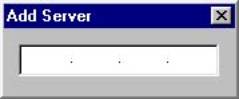
Add Server popup box
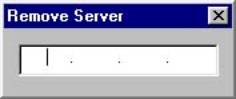
Remove Server popup box
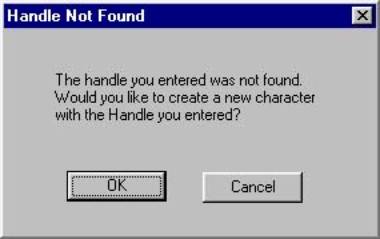
Handle Not Found popup box
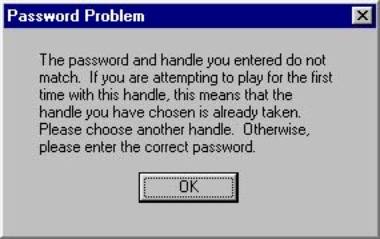
Password Problem popup box
Loading Screen

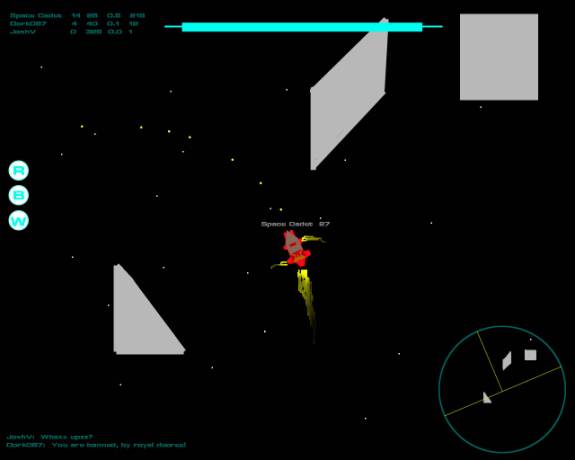
Top Down In Game View
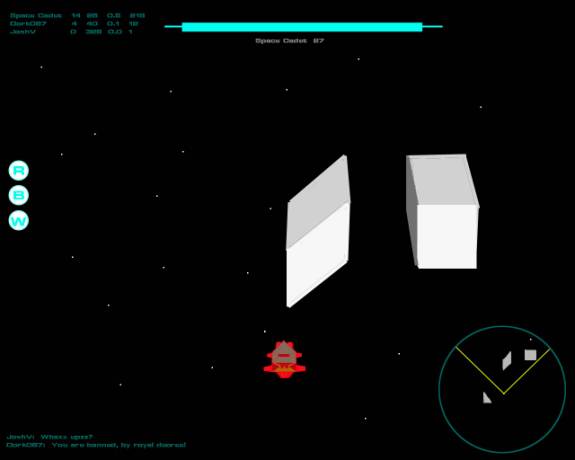
¾ Top Down 3rd Person In Game View
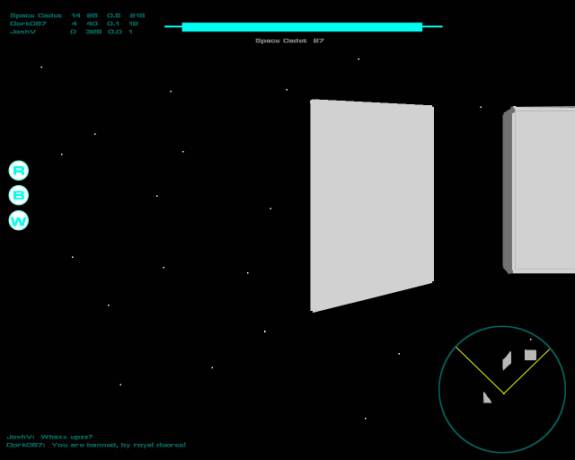
1st Person In Game View
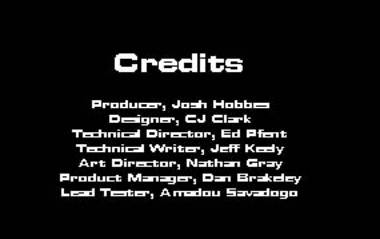
Credits Screen
Functional Requirements
GUI Objects
All text is displayed with transparent background so as not to obscure the player’s view. The name of each player and their bounty value is displayed above their ship, including you. A color-changing bar at the top of the screen displays your ships current energy value. It fades from blue to red and gets shorter as you lose energy. Your current power ups are displayed on the left side of the screen with a number indicating how many of each power up you have. The most recent chat messages are displayed at the bottom of the screen. You can press enter to begin typing a message, which is displayed underneath these messages, and press enter again to send the message.
Main Menu
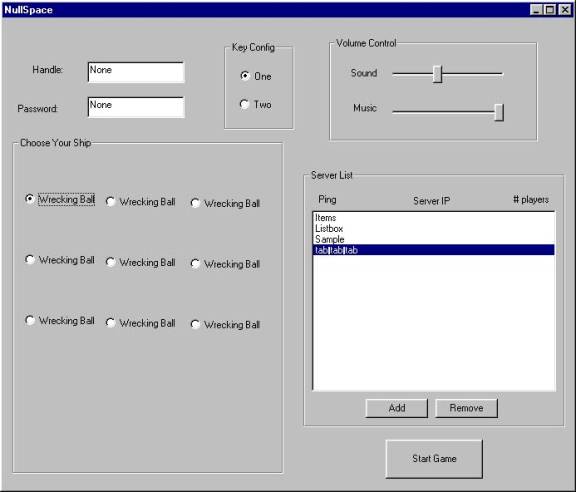
The main menu will allow the player to select their ship, handle, password, and server. The currently selected ship will be shown. Clicking on small pictures of the other ships changes the currently selected ship. There will be a dialog box for the user to enter in their handle, a name that they will be known by in the game. There will be another dialog box for the player to enter a password. This password protects the identity of the player’s handle, keeping other players from impersonating the player. There will also be a list of active servers. Beside each server IP with be numbers denoting how many players are on the server and that servers’ ping. Clicking on a server name will highlight that name and that server will be selected. There will be a start game button that will close the main menu and connect to the selected server. The player can edit the server list with an Add Server button and a Remove Server button. The Add Server button will pop up a dialog box where the player types in a server name he wants to add to the list, while the Remove Server button removes the currently selected server from the list.
The option menu will allow the player to change the sound and music volumes, as well as select the key configuration. The key configurations will be detailed in the configuration section below.
In Game
In game menus are all hotkeys. Pressing F1 brings up a help list of what the hotkeys do. A list of the hotkeys can be found in the controls section.
The player can see the following things while playing NullSpace:
The View – There are three view positions for the camera.
1. Top-down – The screen is always oriented with the map’s compass points being stationary, and the ship’s model rotates as the player turns.
2. Three-quarters – The top-down view with the camera tilted slightly so that a bit more is viewable in front of the ship, and a bit less behind it. The camera will rotate with the ship in this mode.
3. First Person – The screen views what the pilot of the ship might view through the front of his or her ship.
Both the top-down and first person views will cover the entire screen area. The rest of the in-game UI elements will be on top of the view near the edges of the screen. Any text will have a transparent background so the main view is visible between letters and words.
The chat area – This is most of the bottom of the screen, and allows the player to see a recent history of chat messages. Also, at the very bottom will be the area where the players can type in their own chat messages.
Energy meter – This is a bar at the top of the screen that changes color from blue to red and shrinks in length as the player loses energy.
Power-Up Info – This is an area on the left of the screen that displays the various power-ups the player currently has and how many of each (for those power-ups of which you can have more than one).
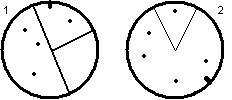
Radar – This is an area on the right side of the screen that shows the player who near his ship. It displays basic information about nearby walls, enemies, and teammates. The orientation of the radar is dependant on the current point-of-view:
1. Top-down – The radar will always have the same orientation as the map (which is stationary). There will be a “T” shape overlaid on the map that indicates the players heading.
2. Three-quarters & First-Person – The radar will have it’s “up” be the direction the player is currently facing, and all the information (walls, players, etc) will rotate around as the player turns. There will be a mark on the outside edge of the radar that indicated “north” on the map. There will also be a highlighted pie-wedge that indicates the player’s field of view.
The two different radar areas would look like this:
Controls
The controls of NullSpace will make use only of the keyboard, as with the classic style game play of SubSpace. There will be two default keyboard configurations that the player can choose from the options menu.
Keyboard Controls – These will be the default keyboard settings. There are two sets that the player can choose from:
|
Keys |
Config #1 |
Config #2 |
|
W |
Forward Thrust |
|
|
S |
Back Thrust |
|
|
A |
Strafe Left |
|
|
D |
Strafe Right |
|
|
Up |
Next Secondary Weapon |
Forward Thrust |
|
Down |
Previous Secondary Weapon |
Backward Thrust |
|
Left |
Turn Left |
Turn Left |
|
Right |
Turn Right |
Turn Right |
|
Alt + Direction |
|
Strafe Modifier |
|
A |
|
Next Secondary Weapon |
|
Z |
|
Previous Secondary Weapon |
|
Ctrl |
|
Fire Primary / Halt ship (while in Safe Zone) |
|
Space |
Fire Primary / Halt ship (while in Safe Zone) |
Fire Secondary |
|
Shift |
Fire Secondary |
|
|
Top-row Number Keys |
Select a specific weapon. |
Select a specific weapon. |
There are also hotkeys that allow the player to do different functions while in the game.
|
Key |
Function |
|
F1 |
Help – List out the following help keys |
|
F2 or TAB |
View the player rankings |
|
ESC |
Quit the game and return to the main menu |
|
“=<team #>” in a chat message |
Change Team/Squad |
Art and Video
Overall Art Concept
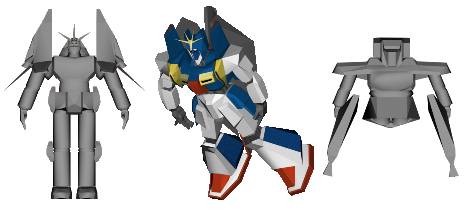
The look and overall feel of NullSpace is that of being in outer space, where futuristic ships and weapons reign. Metallic graphics would accentuate the look and feel of the environment and time period. The menu will feature a semi-transparent black background with smooth metal borders and have text in an extra wide steel-colored font. In-game menus and the HUD will have a similar appearance with grays and greens being the dominant colors for the radar and score displays. The spaceships and robots that the players will control will feature a little more color as a way of being distinctive, but the prevailing theme will still be the cold metallic look of steel. NullSpace has a part-time artist to help realize these objectives.
Concept Art
2D/3D Art
The 2D Art will be predominantly for the particles and the textures for the models. There will also be flat images for the menu and the in-game HUD. Because of the versatility of the OpenGL texture system, our textures will not be limited to specific sizes as all resizing is done within the game itself. For obvious reasons, no texture should exceed 500k in size.
The 3D Art will be the spaceships, robots, and walls. No one object is to exceed 2500 polygons in size, as that would be too taxing on the graphics engine. The walls will be extensions of 2D concepts into 3D. If time permits, 3D models of planets will appear scattered about through the map underneath and above the field of play to help provide the player with landmarks and a better sense of their velocity. These will simply be texture-mapped spheres, a simple object to create.
We will require the following pieces of 3D Art:
- 9 Ships, one for each of the descriptions in the “Character and units” section.
- Stationary animation that can be rotated/scaled by the engine for common movement.
- Explosion animation that can be played upon a player’s death.
- The Multi-prize – A Green sphere.
- Projectile Weapons
- Bomb (explosions will be particle effects, not art)
- Shots
- Anchor
- Walls
2D Art list
- Wall Textures
- At least 4 different textures, assignable in the map editor (or by map).
- Black Hole texture
- Ship textures (depends on ship)
- Projectile textures
- Explosions – combinations of 2D textures and particles
Special Effect list
- Particle Engine. Used for:
- Explosions
- Jet smoke/flames
- Shrapnel
- Repel
Animation
There will be no animations. We will instead use particle effects. A good example of this is that when a player turns left or right there will be a jet of flame indicating a thruster on the side of their ship has fired, rotating them to the side, instead of having the ship perform a “turning” animation.
Marketing & Box
The box art will involve high poly renders of one or more of the ships from the game. The title will be overlaid on top, and screenshots will be scattered amongst key features on the back. The box will also feature a sleek gray color as though it were plated in sheet metal to help grab the attention of the passerby. A render of futuristic battle could be used for magazine spots, and we could get James Earl Jones to narrate a commercial filled with footage of actual game play.
We already have Jackie Chan signed up for the movie, and Hasbro to do the action figures. We will have advertising in all major European, American, and Japanese trade publications, as well as billboards in all major cities around the world. New breakthroughs in holographic technology will allow us to project 3D images from the game onto the moon.
We feel this will best position us in the global market to achieve sales perfection. After dominating the world game markets, will use our newfound powers for evil and corruption. The world will bow before us. Muwahahahahaha.
Terrain
NullSpace takes place in an outer-space environment. To help the player establish their orientation, the background will be filled with bright white stars far enough in the distance that the player will get an idea of its vastness. The player’s perception of their immediate velocity will be mostly assisted by their relative locations to the walls, which are another important feature of the terrain.
Terrain Objects
Planetary shapes like moons or planets that are fully textured will appear beneath the plane of play but will stay close enough that the player has a better sense of relative motion and so that the environment is not totally devoid of objects. The most important objects in the terrain are the walls themselves, which can have any of a motif of textures (predominantly the “steel look”) and provide collision for the player.
Game play elements
The game play elements consist of two types of objects: player-controlled objects (the ships/robots) and non player-controlled objects (the missiles/other weapons). The player-controlled objects all will have firing animations and will consist of less than five hundred polygons each to attain an acceptable frame rate no matter how many occupy the screen at once. By an inherent feature of the 3D graphics engine, no rotations or scaling of the objects need to be done ahead of time, and they can be viewed from any angle from within the game.
1) Bullet
a) Small, colored sphere
2) Bomb
a) Large, colored sphere
4) Shrapnel
a) Very small polygons
5) Repel
a) Expanding rings
6) Brick
a) Looks like a wall, but has a different color than normal walls
7) Warp Gate
a) Glowing blob
8) Anchor (a.k.a. Pendulum)
a) Small sphere on a line
9) Multi-Prize (see above list)
a) Green, package shape
10) Safe Zone
a) Green area
11) Wall (environment)
a) Polygons
12) Black Hole
a) Swirling Black blob
13) Explosion
a) Fiery explosion, rings, smoke
14) Jet Trail
a) Conical flames and smoke
15) Ship
a) Space ship
Cinematic and Video
NullSpace will not contain any video but, if time permits, will instead include a preview at the beginning of the game of some game play, featuring robots and spaceships battling each other from various camera angles. This will accompany the game’s opening musical theme and try to match the tone and beat of the music.
Sound and Music
Sound Effects
The sound should have simple, straightforward sounds that would be found in this style of game. The ships should have noises for their different functionality; the weapons should have noises that make sense (a large bomb should have a big explosion, while a small energy shot would have a more subdued hit noise). The game itself will not have any ambient sounds besides the background music.
Music
The music should reflect the game play: fast and chaotic. There should be a Title Theme that will play during the title screen and while the player is using the main menu. Once the player is in game, there should be 2 or 3 tracks of in-game music that will play randomly.
Sound and Music Formats
The sound files will be in WAV or MP3 format, and the music in MP3 format.
Sound and Music Requirements
I. GUI Sounds
a. Mouse-over – This sound will play as the mouse is dragged over different UI elements and they become selected/unselected.
b. Selection – When the user selects any in-game buttons or menus, there will be a generic acknowledgement noise.
II. In-Game Sounds
a.
Weapons Fire – These are noises made when the user
presses the weapon fire button. These
sounds happen immediately and end quickly.
i. Bullet – Basic “Ptooo…” firing noise.
ii. Bomb – Large “Boomfph” launching noise.
iii. Mine – An electronic beep indicating the mine has been activated.
b.
Weapons Hit – These are the noises made when a
weapon hits something. That something
could be a wall, another player, whatever.
The point is it collided and needs to make a sound.
i. Bullet – A “tink” or other light metallic noise.
ii. Bomb – An explosion of some sort, although not long and drawn out.
iii. Explosion (aka Death) – An explosion bigger and more imposing than the Bomb weapon hit noise.
iv. Shrapnel
c.
Ship Noises – These are all the noises a ship can
make besides the weapon noises.
i. Thrusters – Typical ship firing thrusters noise, and something that can be looped.
ii. Spawn – Some sort of “fzzt” or electrical/warping noise to signify a player has just appeared out of nowhere.
d. Item noises
i. Repel
ii. Brick
iii. Warp Gate
iv. Anchor (aka Pendulum)
v. Multi-Prize
vi. Wall Collision – whenever anything hits a wall
vii. Black Hole – when the player enters (aka collides) with a black hole
III. Music
a. Title/Menu Music – The music played during the opening title screen and the menus (aka whenever the player isn’t playing the game).
i.
1 Track
b.
In-Game Music – The music that is playing behind
the player while the game is in session.
i.
2 or 3 Tracks
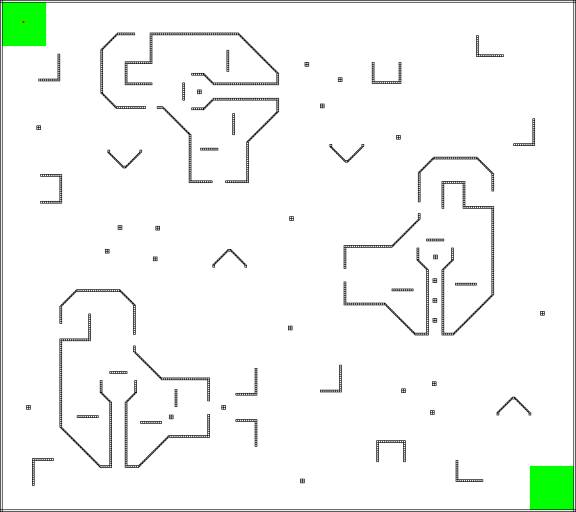
Level Requirements
Level Diagrams
Asset Revelation Schedule
Due to the multiplayer nature of the game all game assets are available to the player at all times. Multi-prize items will allow the player to get these assets at a random amount in every arena in the game. The randomness of each Multi-prize item is the same for each arena. Therefore all weapons, power-ups, enemies, obstacles and strategies will be available to the player from the start of the game.
Level Design Seeds
The core functionality of each level will be similar to each other. Since the game is based in a multiplayer death-match/team-based environment there will be no separate style or feel to any of the levels. Each arena will be unique but different in its own way. The base style that each arena will follow will be in large open area's where the player can see far ahead depending upon their camera setting. The levels will house certain close quarters death match battle along with large open area's for good team battling. There will be very few narrow corridors with sharp corners due to the difficulty of turning in a space environment. Each level will use these same elements to create realistic and fun battle arenas.
Legal Analysis
No registered trademarks will be used, nor will any graphics, music, sounds, or other copyrighted content be used without written permission. NullSpace will be built from original work done by DigiPen students, without any hack or reverse engineering of any existing material, copyrighted or otherwise.
The graphics, music, and sound (art content) for the NullSpace project are to be done entirely by members of the NullSpace GAM350 team, or by artists who create content specifically for use by the NullSpace project, or by artists who have previously created content, and from whom written permission to use such content has been obtained. All material created specifically for this project by DigiPen students using DigiPen equipment will be owned by DigiPen. Material not owned by DigiPen cannot be used without statements to the effect that DigiPen can use such material in the context of the NullSpace project for any means DigiPen deems necessary, including in the use of any promotional material.
NullSpace features 3-D space combat on a 2-D plane. All models depict the outer hull of a space ship or non-animate objects such as walls and asteroids. When a ship is destroyed, it will explode or otherwise convey to the player that his shield has collapsed and hull compromised. No human suffering will be depicted, and no screams or cries of pain and/or anguish will be heard. There is no direct gore or violence to human or animal. There is also no nudity, profanity, or other objectionable contents (like the depiction of drugs or alcohol) anywhere in the game.
There will be an uncensored chat interface so the players can talk with one another in game across the Internet. This leads to the possibility that players will be exposed to offensive material by other players. This should be noted in the manual or on the box so that parents can take appropriate actions to protect their children, and so players understand that such comments are not generated or endorsed by the makers of NullSpace or DigiPen Institute of Technology.
Sound and Music Legal Information
Dan Brakeley (NullSpace Product Manager) has already created the Title Theme. Dan created the music using his own time and equipment (not created on campus or with the assistance of any DigiPen computers, technology, or people). Therefore, Dan Brakeley retains the copyright to said music, but will grant full use of the music to DigiPen for any purpose, so long as that purpose does not separate the music from the context of the NullSpace project.
The sound effects will be taken from Sound Libraries owned by DigiPen, or from public-domain sources on the Internet, or will be created by the NullSpace project team members.
Existing Code
Code
not written by team members
X-Audio SDK - This is a software development kit used for WAV and MP3 playback. It is freely available for non-commercial use.
Standard Template Library (STL) - This is a standard library supplied with Visual C++ for the easy facilitation of linked list, stack, and queue data structures.
Code written by team members
Nathan Gray
-Code to facilitate the easy integration of the X-Audio binaries into any project.
-OpenGL code to load in a model and display it.
-Code to animate 3D models by interpolation.
-Code to move camera position in an OpenGL world.
-Input system utilizing Direct Input.
Nathan Gray and Mike Lodge-Paolini
-Network code from the Karmic Retribution 2 Engine (Fall 2000, GAM 250)
Dan Brakeley
-Code to print text in any Windows True Type font to an OpenGL window.
-Code to load in BMP graphic files and draw basic UI elements (incomplete)
Most of the above mentioned code will need minor or major reworking to be used in the NullSpace project. The only code ready to go is the code related to the X-Audio SDK written by Nathan Gray.
Market Analysis
Target Market
Our target market will be to players of ages 13 and up giving us an ESRB rating of Teen. The types of players that will be attracted to this genre of game are those that like to play death match games where the player competes against other players, computer opponents, or play in a team vs. team type of game play.
Competitive Analysis
There are currently many games in the market that NullSpace are in direct competition with. These games have a strong foothold in the marketplace. NullSpace has new and exciting key features that these games do not possess, but yet keeping the stimulating game play that all the previous games had.
NullSpace is in direct competition with two games familiar to the marketplace. These two games are Virgin Interactive Entertainment’s SubSpace and Titeware’s GenJox. Considering the popularity of these games, we believe that NullSpace has unique key features to directly compete with these titles while still maintaining the aspect of game play that made these games so popular.
Product: Subspace Product: GenJox
Developers: Virgin Interactive Entertainment Developers: Titeware
Platform: PC Platform: PC
|
|
|
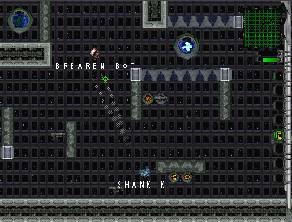
Top Competing Performers by Key Feature
Newtonian Physics
Accurate Newtonian physics for game-play that is intuitive
to learn and hard to master
The physics and game play arena in NullSpace are similar to the 1997 Virgin Interactive Entertainment game entitled SubSpace. SubSpace uses Newtonian physics to maneuver your ship to fire projectile weapons. This makes the control scheme very simple to learn, but control very difficult to master. NullSpace, however, makes use of different camera angles and 3D models to increase the variety and visual intensity that such a physics model can provide. In SubSpace, you are locked into a view looking straight down from above, but in NullSpace you can also go into a first-person view mode where what you can see changes dramatically. Also, in SubSpace the amount a player can see around his/her ship is dependant upon the resolution you play at. The higher the resolution, the more you can see. NullSpace will not be resolution dependant, and so people with larger monitors will not get a large play advantage.
Persistent Online Multiplayer
Online, persistent death match for continuous multiplayer
game play
There are lots of games that boast networking across the Internet, and in order to be competitive it is necessary to offer similar features. NullSpace will allow anyone to put up a server and have people join in the fun. The difference between NullSpace and similar competitors is that in a NullSpace Sever, when there are a small number of human players logged in, extra AI players are added so there will always be lots of action keep the human players interested.
Multiple View Modes
Top-down, ¾, and first-person view modes allow for a greater
variety of game-play
The ability
to change the view from a top down to a first person has been used before in a
variety of settings, but rarely in a fast paced, death match oriented
game. Examples of similar camera
settings can be found in Bullfrog’s 1997 Dungeon Keeper, which allows
you to perform high-level decisions in an omniscient, top-down view, or control
individual creatures directly by possessing them and then seeing through their
eyes. Another game with adjustable
camera angles, but also with real-time space combat, is Accolade’s 1996 Star
Control 3, which allows the player
to switch between a top down view and an isometric view during combat. The difference between these games and NullSpace is that the camera angle becomes something controllable by the
server. That way, if you join a server
that has the camera locked in the top-down view, all players will be able to
see people on all sides of their ship, while an identical server with the
camera locked in first-person view will cause all players to be unable to
determine who is behind them, but be able to see farther in front of them. This increases the game play variety on each
level and also keeps things fair by having a consistent view for all players.
GenJox and Subspace do not possess the ability to change your camera angle. In these two games the player is locked into a top-down view of the game. In NullSpace, the addition of two more camera angles will appeal to a broader audience for those who like playing in the first person view, top-down view, or a three-quarters behind the back view. Adding these camera angles will allow for more interesting game play and strategy.
Technical Analysis
Experimental Features
1) Persistent Environment - Having network code that will handle a persistent environment.
2) OpenGL – Using OpenGL is new to most members of the programming team. This includes drawing, adding models, camera positions, and any special effects (i.e. explosions using a particle system).
Major Development Tasks
1) Graphics/Camera Positions (view ports) - Using OpenGL to create a graphics engine that can draw 3D models, textures and camera positions, so the player can choose between 3rd person and 1st person views.
2) Networking – Two separate applications: One for the server and one for the client. Both will use TCP and UDP for the most efficient data transfer possible.
3) Input - An input engine that allows players to use a keyboard/mouse interface. Possible input devices to be added later: game pad and joystick.
4) Physics – A physics engine that can simulate Newtonian physics, giving the player a realistic feel of space flying.
5) A.I. – Computer controlled “bots”, ranging in difficulty, to keep the game environment full and keeping the game intense.
6) Audio – A sound engine that can handle both mp3s and wave files.
Risks
1) Persistent Environment – This type of networking has never been programmed by our programmers but should remain a minimal problem due to the simplistic server/client model being employed.
2) OpenGL – Most of the programmers on the team have little to none experience using OpenGL. The two programmers that have OpenGL experience feel confident that learning/using OpenGL will not be problem.
Alternatives
1) Persistent Environment – If, for any reason, the persistent environment will not be able to be completed, the networking will then be changed to incorporate a player into being a host and other players can join that host’s game.
2) OpenGL – If, for any reason, problems occur using OpenGL then any added features, such as a particle base explosions, will be removed. Loading models and textures have already been tested so the last possible option would be having simple models and graphics against an empty background with no special effects.
Estimated Resources
1)
Programmers – The programming team consists
of seven seasoned coders. Each of which
will put in 15 hours a week into the game.
2)
Artist – There is one part time artist from
the art department.
3)
Hardware – 7 Pentium III 1.0GHz w/256MB RAM
4)
Software – 7 Microsoft visual C++, Microsoft Visual
SourceSafe
Revenue Projections
Total Estimated Revenue
|
COSTS |
|
|
|
|
|
|
|
|
|
|
|
|
|
Computers - Hardware & Software |
# |
Each |
Total |
|
|
|
-Pentium III 1.0GHz w/ 256MB RAM |
7 |
$1,787.00 |
$12,509.00 |
|
|
|
-Microsoft Visual C++ |
7 |
$451.95 |
$3,163.65 |
|
|
|
-Microsoft Visual SourceSafe |
7 |
$474.95 |
$3,324.65 |
|
|
|
|
|
|
|
|
|
|
TOTAL HARDWARE/SOFTWARE COSTS |
|
|
$18,997.30 |
|
|
|
|
|
|
|
|
|
|
Full Time Employees |
# |
Per Month |
Total |
|
|
|
-Producer |
3 |
5,000.00 |
$15,000.00 |
|
|
|
-Technical Director |
3 |
5,769.23 |
$17,307.69 |
|
|
|
-Designer |
3 |
4,615.38 |
$13,846.14 |
|
|
|
-Technical Writer |
3 |
3,076.39 |
$9,229.17 |
|
|
|
-Product Manager |
3 |
6,538.65 |
$19,615.95 |
|
|
|
-Lead Tester |
3 |
4,235.67 |
$12,707.01 |
|
|
|
-Art Director |
3 |
4,000.00 |
$12,000.00 |
|
|
|
|
|
|
|
|
|
|
TOTAL SALARY COSTS |
|
|
$99,705.96 |
|
|
|
|
|
|
|
|
|
|
Other Expenses |
|
|
Total |
|
|
|
-Music/Sound Effects |
|
|
$2,000.00 |
|
|
|
-Art |
|
|
$3,000.00 |
|
|
|
-Other (rent, utilities, etc.) |
|
|
$10,000.00 |
|
|
|
|
|
|
|
|
|
|
TOTAL MISC. COSTS |
|
|
$15,000.00 |
|
|
|
|
|
|
|
|
|
|
TOTAL COSTS |
|
|
$133,703.26
|
|
|
|
|
|
|
|
|
|
|
|
|
|
|
|
|
|
COSTS PER
UNIT |
|
|
|
|
|
|
|
|
|
|
|
|
|
Part |
|
Each |
20,000 |
30,000 |
50,000 |
|
|
|
|
|
|
|
|
CD (Includes
Electronic Manual) |
|
$1.00 |
$20,000.00 |
$30,000.00 |
$50,000.00 |
|
Installation Sheet
(Manual on CD) |
|
$0.25 |
$5,000.00 |
$7,500.00 |
$12,500.00 |
|
Data/Eratta Sheet |
|
$0.25 |
$5,000.00 |
$7,500.00 |
$12,500.00 |
|
PROFIT |
|
$4.99 |
$99,800.00 |
$149,700.00 |
$249,500.00 |
|
|
|
|
|
|
|
|
TOTAL |
|
$6.49 |
$129,800.00 |
$194,700.00 |
$324,500.00 |
|
STORE FINAL PRICE (100% MARKUP) |
|
$12.98 |
|
|
|
|
|
|
|
|
|
|
|
PROJECTED
REVENUE |
|
|
($33,903.26) |
$15,996.74
|
$115,796.74
|
Weekly Goals
|
Week 1 Goals |
Separate
sections of Game Concept for team members to do. |
|
Finish
Game Concept by end of the week. |
|
Week 2 Goals |
Separate
sections of GDD for team members to work on. |
|
Have
rough draft of GDD by end of the week. |
|
Week 3 Goals |
Go over
and revise sections of GDD. |
|
Start to
plan TDD. |
|
|
Have GDD
finished at end of the week. |
|
Week 4 Goals |
Separate
sections of TDD for team members to work on. |
|
Have TDD
finished by the end of the week. |
|
Week 5 Goals |
Finish
Front End by the end of the week. |
|
Start
work on the Graphics Engine. |
|
|
Start
work on the Input. |
|
|
Have
functional Map Editor by the end of the week. |
|
|
Start work
on the Collision and Physics Engine. |
|
Week 6 Goals |
Have
functional Graphics Engine. |
|
Have
functional Collision and Physics. |
|
|
Have
functional Input. |
|
|
Start
work on U.I. |
|
Week 7 Goals |
Graphics
Engine Finished. |
|
Input
Finished. |
|
|
Map
Editor Finished. |
|
|
Some
Physics and Collision in the actual game engine. |
|
|
Start
work on Networking and Chat ability. |
|
|
Start
work on Object Placement. |
|
|
Start
work on Special Effects. |
|
Week 8 Goals |
U.I. In
the game. |
|
Collision
functions finished. |
|
|
Some of
implemented Physics in game. |
|
|
Be able
to see other player over network and send text messages. |
|
|
At least
one Special Effect implemented. |
|
|
Be able
to place an Object in the game. |
|
|
Start
work on Scoring. |
|
|
Start
work on Menu system. |
|
Week 9 Goals |
Physics
Engine Finished. |
|
Networking
and Chat interface finished. |
|
|
Object
Placement functions finished. |
|
|
Scoring
functions finished. |
|
|
Functional
Menu. |
|
|
Start
work on A.I. |
|
|
Most
Special Effects implemented. |
|
Week 10 Goals |
Special
Effects finished. |
|
Menu
finished. |
|
|
Camera
Movement finished. |
|
|
Some A.I.
Routines functional. |
|
|
Start
work on Sound and Music. |
|
Week 11 Goals |
A.I.
Finished. |
|
Sound and
Music finished. |
|
|
Reach
Alpha stage. |
|
|
Have a
good Thanksgiving Break. |
|
Week 12 Goals |
Begin
U.I. Testing. Any bugs fixed by end of week. |
|
Begin
Physics and Collision testing. Any bugs fixed by end of week. |
|
|
Begin
In-Game function testing. Any bugs fixed by end of week. |
|
|
Begin
Game Play testing. Any bugs fixed by end of week. |
|
Week 13 Goals |
All
testing complete. |
|
Any bugs
fixed. |
Labor Report
Actual Hours
|
Week 1 9/10/01 - 9/16/01 |
Mon |
Tue |
Wed |
Thu |
Fri |
Sat |
Sun |
Total |
|
|
Art
Director |
Nathan
Gray |
4 |
4 |
3 |
0 |
1 |
0 |
0 |
12 |
|
Designer |
Charles
Clark |
4 |
4 |
3 |
0 |
1 |
0 |
0 |
12 |
|
Lead
Tester |
Amadou
Savadogo |
4 |
4 |
3 |
0 |
1 |
0 |
0 |
12 |
|
Producer |
Josh
Hobbs |
4 |
4 |
3 |
0 |
1 |
0 |
0 |
12 |
|
Product
Manager |
Dan
Brakeley |
4 |
4 |
3 |
0 |
1 |
0 |
0 |
12 |
|
Tech
Director |
Ed Pfent |
4 |
4 |
3 |
0 |
1 |
0 |
0 |
12 |
|
Tech
Writer |
Jeff
Keely |
4 |
4 |
3 |
0 |
1 |
0 |
0 |
12 |
|
Week 2 9/17/01 - 9/23/01 |
Mon |
Tue |
Wed |
Thu |
Fri |
Sat |
Sun |
Total |
|
|
Art
Director |
Nathan
Gray |
5 |
2.5 |
2.5 |
1 |
4 |
0 |
0 |
15 |
|
Designer |
Charles
Clark |
5 |
2.5 |
2.5 |
1 |
2 |
0 |
0 |
13 |
|
Lead
Tester |
Amadou
Savadogo |
5 |
3 |
1 |
1 |
2 |
0 |
0 |
12 |
|
Producer |
Josh
Hobbs |
5 |
3 |
1 |
0 |
2 |
0 |
0 |
11 |
|
Product
Manager |
Dan
Brakeley |
5 |
4 |
2 |
0 |
0 |
0 |
0 |
11 |
|
Tech
Director |
Ed Pfent |
5 |
3 |
3 |
0 |
2 |
0 |
0 |
13 |
|
Tech
Writer |
Jeff
Keely |
5 |
3 |
2 |
1 |
1 |
0 |
0 |
12 |
|
Week 3 9/24/01 - 9/30/01 |
Mon |
Tue |
Wed |
Thu |
Fri |
Sat |
Sun |
Total |
|
|
Art
Director |
Nathan
Gray |
4.5 |
4 |
2 |
1.5 |
1 |
5 |
0 |
18 |
|
Designer |
Charles
Clark |
4.5 |
4 |
2 |
1.5 |
1 |
5 |
0 |
18 |
|
Lead
Tester |
Amadou
Savadogo |
4.5 |
4 |
2 |
1.5 |
1 |
5 |
0 |
18 |
|
Producer |
Josh
Hobbs |
4.5 |
4 |
2 |
1.5 |
0.5 |
6 |
0 |
18.5 |
|
Product
Manager |
Dan
Brakeley |
4.5 |
4 |
2 |
1.5 |
1 |
5 |
0 |
18 |
|
Tech
Director |
Ed Pfent |
4.5 |
4 |
2 |
1.5 |
1 |
5 |
0 |
18 |
|
Tech
Writer |
Jeff
Keely |
4.5 |
4 |
2 |
1.5 |
1 |
5 |
0 |
18 |
|
Week 4 10/01/01 - 10/07/01 |
Mon |
Tue |
Wed |
Thu |
Fri |
Sat |
Sun |
Total |
|
|
Art
Director |
Nathan
Gray |
4.5 |
5 |
3 |
2 |
3 |
2 |
0 |
19.5 |
|
Designer |
Charles
Clark |
4.5 |
5 |
3 |
3 |
0 |
0 |
0 |
15.5 |
|
Lead
Tester |
Amadou
Savadogo |
4.5 |
5 |
3 |
2 |
3 |
2 |
0 |
19.5 |
|
Producer |
Josh
Hobbs |
4.5 |
5 |
3 |
2 |
3 |
2 |
0 |
19.5 |
|
Product
Manager |
Dan
Brakeley |
5 |
4 |
2 |
1 |
3 |
2 |
0 |
17 |
|
Tech
Director |
Ed Pfent |
4.5 |
5 |
3 |
3 |
3 |
2 |
0 |
20.5 |
|
Tech
Writer |
Jeff Keely |
4.5 |
5 |
3 |
2 |
3 |
2 |
0 |
19.5 |
Budgeted Hours
|
Week 1 9/10/01 - 9/16/01 |
Mon |
Tue |
Wed |
Thu |
Fri |
Sat |
Sun |
Total |
|
|
Art
Director |
Nathan
Gray |
4 |
4 |
3 |
0 |
1 |
0 |
0 |
12 |
|
Designer |
Charles
Clark |
4 |
4 |
3 |
0 |
1 |
0 |
0 |
12 |
|
Lead
Tester |
Amadou
Savadogo |
4 |
4 |
3 |
0 |
1 |
0 |
0 |
12 |
|
Producer |
Josh
Hobbs |
4 |
4 |
3 |
0 |
1 |
0 |
0 |
12 |
|
Product
Manager |
Dan
Brakeley |
4 |
4 |
3 |
0 |
1 |
0 |
0 |
12 |
|
Tech
Director |
Ed Pfent |
4 |
4 |
3 |
0 |
1 |
0 |
0 |
12 |
|
Tech
Writer |
Jeff
Keely |
4 |
4 |
3 |
0 |
1 |
0 |
0 |
12 |
|
Week 2 9/17/01 - 9/23/01 |
Mon |
Tue |
Wed |
Thu |
Fri |
Sat |
Sun |
Total |
|
|
Art
Director |
Nathan
Gray |
5 |
2.5 |
2.5 |
1 |
4 |
0 |
0 |
15 |
|
Designer |
Charles
Clark |
5 |
2.5 |
2.5 |
1 |
2 |
0 |
0 |
13 |
|
Lead
Tester |
Amadou
Savadogo |
5 |
3 |
1 |
1 |
2 |
0 |
0 |
12 |
|
Producer |
Josh
Hobbs |
5 |
3 |
1 |
0 |
2 |
0 |
0 |
11 |
|
Product
Manager |
Dan
Brakeley |
5 |
4 |
2 |
0 |
0 |
0 |
0 |
11 |
|
Tech
Director |
Ed Pfent |
5 |
3 |
3 |
0 |
2 |
0 |
0 |
13 |
|
Tech
Writer |
Jeff
Keely |
5 |
3 |
2 |
1 |
1 |
0 |
0 |
12 |
|
Week 3 9/24/01 - 9/30/01 |
Mon |
Tue |
Wed |
Thu |
Fri |
Sat |
Sun |
Total |
|
|
Art
Director |
Nathan
Gray |
4.5 |
4 |
2 |
1.5 |
1 |
5 |
0 |
18 |
|
Designer |
Charles
Clark |
4.5 |
4 |
2 |
1.5 |
1 |
5 |
0 |
18 |
|
Lead
Tester |
Amadou
Savadogo |
4.5 |
4 |
2 |
1.5 |
1 |
5 |
0 |
18 |
|
Producer |
Josh
Hobbs |
4.5 |
4 |
2 |
1.5 |
0.5 |
6 |
0 |
18.5 |
|
Product
Manager |
Dan
Brakeley |
4.5 |
4 |
2 |
1.5 |
1 |
5 |
0 |
18 |
|
Tech
Director |
Ed Pfent |
4.5 |
4 |
2 |
1.5 |
1 |
5 |
0 |
18 |
|
Tech
Writer |
Jeff
Keely |
4.5 |
4 |
2 |
1.5 |
1 |
5 |
0 |
18 |
|
Week 4 10/01/01 - 10/07/01 |
Mon |
Tue |
Wed |
Thu |
Fri |
Sat |
Sun |
Total |
|
|
Art
Director |
Nathan
Gray |
4.5 |
5 |
3 |
2 |
3 |
2 |
0 |
19.5 |
|
Designer |
Charles
Clark |
4.5 |
5 |
3 |
3 |
0 |
0 |
0 |
15.5 |
|
Lead
Tester |
Amadou
Savadogo |
4.5 |
5 |
3 |
2 |
3 |
2 |
0 |
19.5 |
|
Producer |
Josh
Hobbs |
4.5 |
5 |
3 |
2 |
3 |
2 |
0 |
19.5 |
|
Product
Manager |
Dan
Brakeley |
5 |
4 |
2 |
1 |
3 |
2 |
0 |
17 |
|
Tech
Director |
Ed Pfent |
4.5 |
5 |
3 |
3 |
3 |
2 |
0 |
20.5 |
|
Tech
Writer |
Jeff
Keely |
4.5 |
5 |
3 |
2 |
3 |
2 |
0 |
19.5 |
|
Week 5 10/08/01 - 10/14/01 |
Mon |
Tue |
Wed |
Thu |
Fri |
Sat |
Sun |
Total |
|
|
Art
Director |
Nathan
Gray |
5 |
4.5 |
3.5 |
1 |
2 |
1 |
0 |
17 |
|
Designer |
Charles
Clark |
5 |
4.5 |
3.5 |
3 |
0 |
0 |
0 |
16 |
|
Lead
Tester |
Amadou
Savadogo |
5 |
4.5 |
3.5 |
1 |
2 |
1 |
0 |
17 |
|
Producer |
Josh
Hobbs |
5 |
4.5 |
3.5 |
1 |
2 |
1 |
0 |
17 |
|
Product
Manager |
Dan
Brakeley |
5 |
4 |
2 |
1 |
3 |
2 |
0 |
17 |
|
Tech
Director |
Ed Pfent |
5 |
4.5 |
3.5 |
3 |
2 |
1 |
0 |
19 |
|
Tech
Writer |
Jeff
Keely |
5 |
4.5 |
3.5 |
1 |
2 |
1 |
0 |
17 |
|
Week 6 10/15/01 - 10/21/01 |
Mon |
Tue |
Wed |
Thu |
Fri |
Sat |
Sun |
Total |
|
|
Art
Director |
Nathan
Gray |
4.5 |
4.5 |
3 |
1 |
2 |
0 |
0 |
15 |
|
Designer |
Charles
Clark |
4.5 |
4.5 |
3 |
3 |
1 |
0 |
0 |
16 |
|
Lead
Tester |
Amadou
Savadogo |
4.5 |
4.5 |
3 |
1 |
2 |
2 |
0 |
17 |
|
Producer |
Josh
Hobbs |
4.5 |
4.5 |
3 |
1 |
3 |
2 |
0 |
18 |
|
Product
Manager |
Dan
Brakeley |
5 |
4 |
2 |
1 |
3 |
2 |
0 |
17 |
|
Tech
Director |
Ed Pfent |
4.5 |
4.5 |
3 |
3 |
2 |
2 |
0 |
19 |
|
Tech
Writer |
Jeff
Keely |
4.5 |
4.5 |
3 |
1 |
2 |
2 |
0 |
17 |
|
Week 7 10/22/01 - 10/28/01 |
Mon |
Tue |
Wed |
Thu |
Fri |
Sat |
Sun |
Total |
|
|
Art
Director |
Nathan
Gray |
4.5 |
4.5 |
3 |
1 |
3 |
2 |
0 |
18 |
|
Designer |
Charles
Clark |
4.5 |
4.5 |
3 |
3 |
1 |
0 |
0 |
16 |
|
Lead
Tester |
Amadou
Savadogo |
4.5 |
4.5 |
3 |
1 |
3 |
2 |
0 |
18 |
|
Producer |
Josh
Hobbs |
4.5 |
4.5 |
3 |
1 |
3 |
2 |
0 |
18 |
|
Product
Manager |
Dan
Brakeley |
5 |
4 |
2 |
1 |
3 |
2 |
0 |
17 |
|
Tech
Director |
Ed Pfent |
4.5 |
4.5 |
3 |
3 |
3 |
2 |
0 |
20 |
|
Tech
Writer |
Jeff
Keely |
4.5 |
4.5 |
3 |
1 |
3 |
2 |
0 |
18 |
|
Week 8 10/29/01 - 11/04/01 |
Mon |
Tue |
Wed |
Thu |
Fri |
Sat |
Sun |
Total |
|
|
Art
Director |
Nathan
Gray |
4.5 |
4.5 |
3 |
1 |
3 |
2 |
0 |
18 |
|
Designer |
Charles
Clark |
4.5 |
4.5 |
3 |
3 |
2 |
0 |
0 |
17 |
|
Lead
Tester |
Amadou
Savadogo |
4.5 |
4.5 |
3 |
1 |
3 |
2 |
0 |
18 |
|
Producer |
Josh
Hobbs |
4.5 |
4.5 |
3 |
1 |
3 |
2 |
0 |
18 |
|
Product
Manager |
Dan
Brakeley |
5 |
4 |
2 |
1 |
3 |
2 |
0 |
17 |
|
Tech
Director |
Ed Pfent |
4.5 |
4.5 |
3 |
3 |
3 |
2 |
0 |
20 |
|
Tech
Writer |
Jeff
Keely |
4.5 |
4.5 |
3 |
1 |
3 |
2 |
0 |
18 |
|
Week 9 11/05/01 - 11/11/01 |
Mon |
Tue |
Wed |
Thu |
Fri |
Sat |
Sun |
Total |
|
|
Art
Director |
Nathan
Gray |
4.5 |
4.5 |
3.5 |
1 |
3 |
2 |
0 |
18.5 |
|
Designer |
Charles
Clark |
4.5 |
4.5 |
3.5 |
3 |
2 |
0 |
0 |
17.5 |
|
Lead
Tester |
Amadou
Savadogo |
4.5 |
4.5 |
3.5 |
1 |
3 |
2 |
0 |
18.5 |
|
Producer |
Josh
Hobbs |
4.5 |
4.5 |
3.5 |
1 |
3 |
2 |
0 |
18.5 |
|
Product
Manager |
Dan
Brakeley |
5 |
4 |
3.5 |
1 |
3 |
2 |
0 |
18.5 |
|
Tech
Director |
Ed Pfent |
4.5 |
4.5 |
3.5 |
4 |
4 |
2 |
0 |
22.5 |
|
Tech
Writer |
Jeff
Keely |
4.5 |
4.5 |
3.5 |
1 |
3 |
2 |
0 |
18.5 |
|
Week 10 11/12/01 - 11/18/01 |
Mon |
Tue |
Wed |
Thu |
Fri |
Sat |
Sun |
Total |
|
|
Art
Director |
Nathan
Gray |
Veterans Day |
5 |
3.5 |
1.5 |
2 |
2 |
0 |
14 |
|
Designer |
Charles
Clark |
5 |
3.5 |
3 |
2 |
0 |
0 |
13.5 |
|
|
Lead
Tester |
Amadou
Savadogo |
5 |
3.5 |
1.5 |
2 |
2 |
0 |
14 |
|
|
Producer |
Josh
Hobbs |
5 |
3.5 |
1.5 |
2 |
2 |
0 |
14 |
|
|
Product
Manager |
Dan
Brakeley |
5 |
3.5 |
1.5 |
2 |
2 |
0 |
14 |
|
|
Tech
Director |
Ed Pfent |
5 |
3.5 |
4.5 |
4 |
2 |
0 |
19 |
|
|
Tech
Writer |
Jeff
Keely |
5 |
3.5 |
1.5 |
2 |
2 |
0 |
14 |
|
|
Week 11 11/19/01 - 11/25/01 |
Mon |
Tue |
Wed |
Thu |
Fri |
Sat |
Sun |
Total |
|
|
Art
Director |
Nathan
Gray |
5 |
5 |
3 |
Thanksgiving Break Alpha Due |
13 |
|||
|
Designer |
Charles
Clark |
5 |
5 |
3 |
13 |
||||
|
Lead
Tester |
Amadou
Savadogo |
5 |
5 |
3 |
13 |
||||
|
Producer |
Josh
Hobbs |
5 |
5 |
3 |
13 |
||||
|
Product
Manager |
Dan
Brakeley |
5 |
5 |
3 |
13 |
||||
|
Tech
Director |
Ed Pfent |
5 |
5 |
3 |
13 |
||||
|
Tech
Writer |
Jeff
Keely |
5 |
5 |
3 |
13 |
||||
|
Week 12 11/26/01 - 12/02/01 |
Mon |
Tue |
Wed |
Thu |
Fri |
Sat |
Sun |
Total |
|
|
Art
Director |
Nathan
Gray |
4.5 |
5 |
3 |
1 |
3 |
3 |
0 |
19.5 |
|
Designer |
Charles
Clark |
4.5 |
5 |
3 |
1 |
3 |
2 |
0 |
18.5 |
|
Lead
Tester |
Amadou
Savadogo |
4.5 |
5 |
3 |
1 |
3 |
2 |
0 |
18.5 |
|
Producer |
Josh
Hobbs |
4.5 |
5 |
3 |
1 |
3 |
2 |
0 |
18.5 |
|
Product
Manager |
Dan
Brakeley |
4.5 |
5 |
3 |
1 |
3 |
2 |
0 |
18.5 |
|
Tech
Director |
Ed Pfent |
4.5 |
5 |
3 |
4 |
4 |
4 |
0 |
24.5 |
|
Tech
Writer |
Jeff
Keely |
4.5 |
5 |
3 |
1 |
3 |
2 |
0 |
18.5 |
|
Week 13 12/03/01 - 12/07/01 |
Mon |
Tue |
Wed |
Thu |
Fri |
Sat |
Sun |
Total |
|
|
Art
Director |
Nathan
Gray |
5 |
5 |
3.5 |
3 |
Gold! |
X |
X |
16.5 |
|
Designer |
Charles
Clark |
5 |
5 |
3.5 |
3 |
X |
X |
16.5 |
|
|
Lead
Tester |
Amadou
Savadogo |
5 |
5 |
3.5 |
3 |
X |
X |
16.5 |
|
|
Producer |
Josh
Hobbs |
5 |
5 |
3.5 |
3 |
X |
X |
16.5 |
|
|
Product
Manager |
Dan
Brakeley |
5 |
5 |
3.5 |
3 |
X |
X |
16.5 |
|
|
Tech
Director |
Ed Pfent |
5 |
5 |
3.5 |
8 |
X |
X |
21.5 |
|
|
Tech
Writer |
Jeff
Keely |
5 |
5 |
3.5 |
3 |
X |
X |
16.5 |
|
|
|
By Day
Total |
391 |
406 |
267.5 |
136.5 |
170.5 |
130 |
0 |
1502 |
|
Individual Totals By Day |
Mon |
Tue |
Wed |
Thu |
Fri |
Sat |
Sun |
Total |
|
|
Art
Director |
Nathan
Gray |
55.5 |
58 |
39.5 |
15 |
27 |
19 |
0 |
214 |
|
Designer |
Charles
Clark |
55.5 |
58 |
39.5 |
27.5 |
15 |
7 |
0 |
202.5 |
|
Lead
Tester |
Amadou
Savadogo |
55.5 |
58.5 |
38 |
15 |
25 |
20 |
0 |
212 |
|
Producer |
Josh
Hobbs |
55.5 |
58.5 |
38 |
14 |
25.5 |
21 |
0 |
212.5 |
|
Product
Manager |
Dan Brakeley |
58 |
56 |
33.5 |
13 |
25 |
21 |
0 |
206.5 |
|
Tech
Director |
Ed Pfent |
55.5 |
58.5 |
40 |
37 |
29 |
22 |
0 |
242 |
|
Tech
Writer |
Jeff
Keely |
55.5 |
58.5 |
39 |
15 |
24 |
20 |
0 |
212 |
Milestone Schedule
Person
|
Nathan |
|
Art Director |
|
Task |
Start |
Completion |
|
Game
Concept |
9/11/01 |
9/16/01 |
|
GDD |
9/18/01 |
9/30/01 |
|
TDD |
10/1/01 |
10/8/01 |
|
Graphics
Engine |
10/8/01 |
10/22/01 |
|
Networking |
10/22/01 |
11/5/01 |
|
Chat |
10/22/01 |
11/5/01 |
|
Camera
Movement |
11/5/01 |
11/13/01 |
|
Sound/Music |
11/13/01 |
11/21/01 |
|
Dan |
|
Project Manager |
|
Task |
Start |
Completion |
|
Game
Concept |
9/11/01 |
9/16/01 |
|
GDD |
9/18/01 |
9/30/01 |
|
TDD |
10/1/01 |
10/8/01 |
|
Front End |
10/8/01 |
10/15/01 |
|
U.I |
10/15/01 |
10/29/01 |
|
Menu |
10/29/01 |
11/13/01 |
|
A.I. |
11/13/01 |
11/21/01 |
|
Josh |
|
Producer |
|
Task |
Start |
Completion |
|
Game
Concept |
9/11/01 |
9/16/01 |
|
GDD |
9/18/01 |
9/30/01 |
|
TDD |
10/1/01 |
10/8/01 |
|
Collision |
10/8/01 |
10/29/01 |
|
Scoring |
10/29/01 |
11/5/01 |
|
Special
Effects |
11/5/01 |
11/13/01 |
|
A.I. |
11/13/01 |
11/21/01 |
|
Ed |
|
Tech Director |
|
Task |
Start |
Completion |
|
Game
Concept |
9/11/01 |
9/16/01 |
|
GDD |
9/18/01 |
9/30/01 |
|
TDD |
10/1/01 |
10/8/01 |
|
Input |
10/8/01 |
10/22/01 |
|
Object
Placement |
10/22/01 |
11/5/01 |
|
A.I. |
11/5/01 |
11/21/01 |
|
CJ |
|
Designer |
|
Task |
Start |
Completion |
|
Game
Concept |
9/11/01 |
9/16/01 |
|
GDD |
9/18/01 |
9/30/01 |
|
TDD |
10/1/01 |
10/8/01 |
|
Map
Editor |
10/8/01 |
10/22/01 |
|
Special
Effects |
10/22/01 |
11/13/01 |
|
A.I. |
11/13/01 |
11/21/01 |
|
Amadou |
|
Lead Tester |
|
Task |
Start |
Completion |
|
Game
Concept |
9/11/01 |
9/16/01 |
|
GDD |
9/18/01 |
9/30/01 |
|
TDD |
10/1/01 |
10/8/01 |
|
Physics |
10/8/01 |
11/5/01 |
|
A.I. |
11/5/01 |
11/21/01 |
|
Jeff |
|
Technical Write |
|
Task |
Start |
Completion |
|
Game
Concept |
9/11/01 |
9/16/01 |
|
GDD |
9/18/01 |
9/30/01 |
|
TDD |
10/1/01 |
10/8/01 |
|
Physics |
10/8/01 |
11/5/01 |
|
A.I. |
11/5/01 |
11/21/01 |
Week
|
Week 1 |
|
9/10/01 - 9/16/01 |
|
Tasks |
Member |
Progress |
|
Game Concept |
All |
Started |
|
Week 2 |
|
9/17/01 - 9/23/01 |
|
Tasks |
Member |
Progress |
|
Game Concept |
All |
Finished |
|
GDD |
All |
Started |
|
Week 3 |
|
9/24/01 - 9/30/01 |
|
Tasks |
Member |
Progress |
|
GDD |
All |
In Work |
|
Week 4 |
|
10/01/01 -10/07/01 |
|
Tasks |
Member |
Progress |
|
GDD |
All |
Finished |
|
TDD |
All |
Started |
|
Week 5 |
|
10/08/01 -10/14/01 |
|
Tasks |
Member |
Progress |
|
TDD |
All |
Finished |
|
Front End |
Dan |
Started |
|
Graphics Engine |
Nathan |
Started |
|
Input |
Ed |
Started |
|
Map Editor |
CJ |
Started |
|
Collision |
Josh |
Started |
|
Physics |
Amadou,Jeff |
Started |
|
Week 6 |
|
10/15/01 -10/21/01 |
|
Tasks |
Member |
Progress |
|
Front End |
Dan |
Finished |
|
Graphics Engine |
Nathan |
In Work |
|
Input |
Ed |
In Work |
|
Map Editor |
CJ |
In Work |
|
Collision |
Josh |
In Work |
|
Physics |
Amadou,Jeff |
In Work |
|
U.I. |
Dan |
Started |
|
Week 7 |
|
10/22/01 -10/28/01 |
|
Tasks |
Member |
Progress |
|
Graphics Engine |
Nathan |
Finished |
|
Input |
Ed |
Finished |
|
Map Editor |
CJ |
Finished |
|
Collision |
Josh |
In Work |
|
Physics |
Amadou,Jeff |
In Work |
|
U.I. |
Dan |
In Work |
|
Networking |
Nathan |
Started |
|
Chat |
Nathan |
Started |
|
Object Placement |
Ed |
Started |
|
Special Effects |
CJ |
Started |
|
Week 8 |
|
10/29/01 -11/04/01 |
|
Tasks |
Member |
Progress |
|
Collision |
Josh |
Finished |
|
U.I. |
Dan |
Finished |
|
Physics |
Amadou,Jeff |
In Work |
|
Networking |
Nathan |
In Work |
|
Chat |
Nathan |
In Work |
|
Object Placement |
Ed |
In Work |
|
Special Effects |
CJ |
In Work |
|
Scoring |
Josh |
Started |
|
Menu |
Dan |
Started |
|
Week 9 |
|
11/05/01 -11/11/01 |
|
Tasks |
Member |
Status |
|
Physics |
Amadou,Jeff |
Finished |
|
Networking |
Nathan |
Finished |
|
Chat |
Nathan |
Finished |
|
Object Placement |
Ed |
Finished |
|
Scoring |
Josh |
Finished |
|
Menu |
Dan |
In Work |
|
Special Effects |
CJ,Josh |
In Work |
|
Camera Movement |
Nathan |
Started |
|
A.I. |
Amadou,Jeff,Ed |
Started |
|
Week 10 |
|
11/12/01 -11/18/01 |
|
Tasks |
Member |
Progress |
|
Special Effects |
CJ,Josh |
Finished |
|
Menu |
Dan |
Finished |
|
Camera Movement |
Nathan |
Finished |
|
A.I. |
All except Nathan |
In Work |
|
Sound/Music |
Nathan |
Started |
|
Week 11 |
|
11/19/01 -11/25/01 |
|
Tasks |
Member |
Progress |
|
A.I. |
All except Nathan |
Finished |
|
Sound/Music |
Nathan |
Finished |
|
Week 12 |
|
11/26/01 -12/02/01 |
||
|
Tasks |
Member |
Progress |
||
|
U.I. Testing |
CJ |
Started |
||
|
Physics Testing |
Nathan, Jeff |
Started |
||
|
Collision Testing |
Ed, Dan |
Started |
||
|
Game Function Testing |
Amadou, Josh |
Started |
||
|
Game Play Testing |
All |
Started |
||
|
Week 13 - Final Week |
12/03/01 -12/07/01 |
|
|
Tasks |
Member |
Progress |
|
U.I. Testing |
CJ |
Finished |
|
Physics Testing |
Nathan, Jeff |
Finished |
|
Collision Testing |
Ed, Dan |
Finished |
|
Game Function Testing |
Amadou, Josh |
Finished |
|
Game Play Testing |
All |
Finished |
Task
|
Task |
Member |
Start |
Complete |
|
Game
Concept |
All |
9/10/01 |
9/17/01 |
|
GDD |
All |
9/17/01 |
10/1/01 |
|
TDD |
All |
10/1/01 |
10/8/01 |
|
Front End |
Dan |
10/8/01 |
10/15/01 |
|
Graphics
Engine |
Nathan |
10/8/01 |
10/22/01 |
|
Input |
Ed |
10/8/01 |
10/22/01 |
|
Map
Editor |
CJ |
10/8/01 |
10/22/01 |
|
Collision |
Josh |
10/8/01 |
10/29/01 |
|
Physics |
Amadou, Jeff |
10/8/01 |
11/5/01 |
|
U.I. |
Dan |
10/15/01 |
10/29/01 |
|
Networking |
Nathan |
10/22/01 |
11/5/01 |
|
Object
Placement |
Ed |
10/22/01 |
11/5/01 |
|
Chat |
Nathan |
10/22/01 |
11/5/01 |
|
Special
Effects |
CJ, Josh |
10/22/01 |
11/13/01 |
|
Scoring |
Josh |
10/29/01 |
11/5/01 |
|
Menu |
Dan |
10/29/01 |
11/13/01 |
|
Camera
Movement |
Nathan |
11/5/01 |
11/13/01 |
|
A.I. |
All except Nathan |
11/5/01 |
11/21/01 |
|
Sound/Music |
Nathan |
11/13/01 |
11/21/01 |